Photo to Coloring Page: How AI Custom Coloring Works for Gifts
By InkPages Editorial · June 27, 2026
The global adult coloring book market hit $1.9 billion in 2025 and is projected to reach $3.4 billion by 2034, growing at an 8.5% CAGR (Verified Market Reports, 2026). Coloring books rank among the top five gift categories for birthdays and holidays, with December alone driving peak search volumes nearly double the annual baseline. Personalized gifts consistently outperform generic ones in recipient satisfaction surveys — and AI now makes it possible to turn any photo into a printable coloring page in under 30 seconds.
What You Need to Know
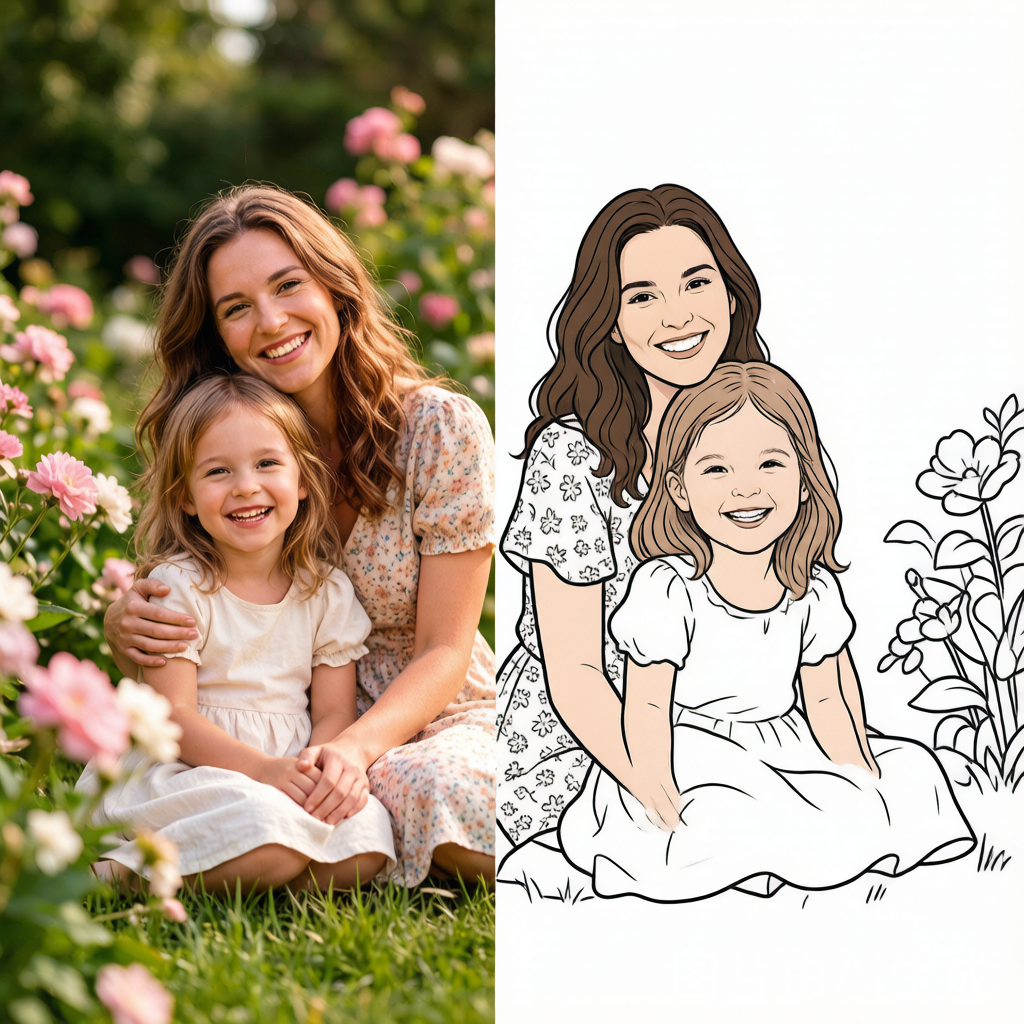
Converting a photo to a coloring page is no longer a manual tracing project that takes hours. Modern AI tools handle edge detection, shading removal, and line simplification in one pass, so a family portrait can become a custom coloring book gift without hiring an illustrator. Here is what drives the output quality:
- Source photo quality matters most. High-contrast images with clear subject separation produce the cleanest outlines. A well-lit portrait against a plain background converts far better than a dim group shot with cluttered scenery.
- Not all AI converters produce the same result. Some tools output thick, child-friendly outlines; others generate fine detail lines suited for adult colorists. Knowing which engine you are working with changes everything.
- Output format determines print quality. PNG at 300 DPI is the minimum for a crisp A4 or letter-size print. JPEG compression artifacts show up as jagged edges on paper.
- Privacy settings exist for a reason. If you are uploading photos of children or family members, use a tool with a private processing mode — the image should not be stored or used for model training.
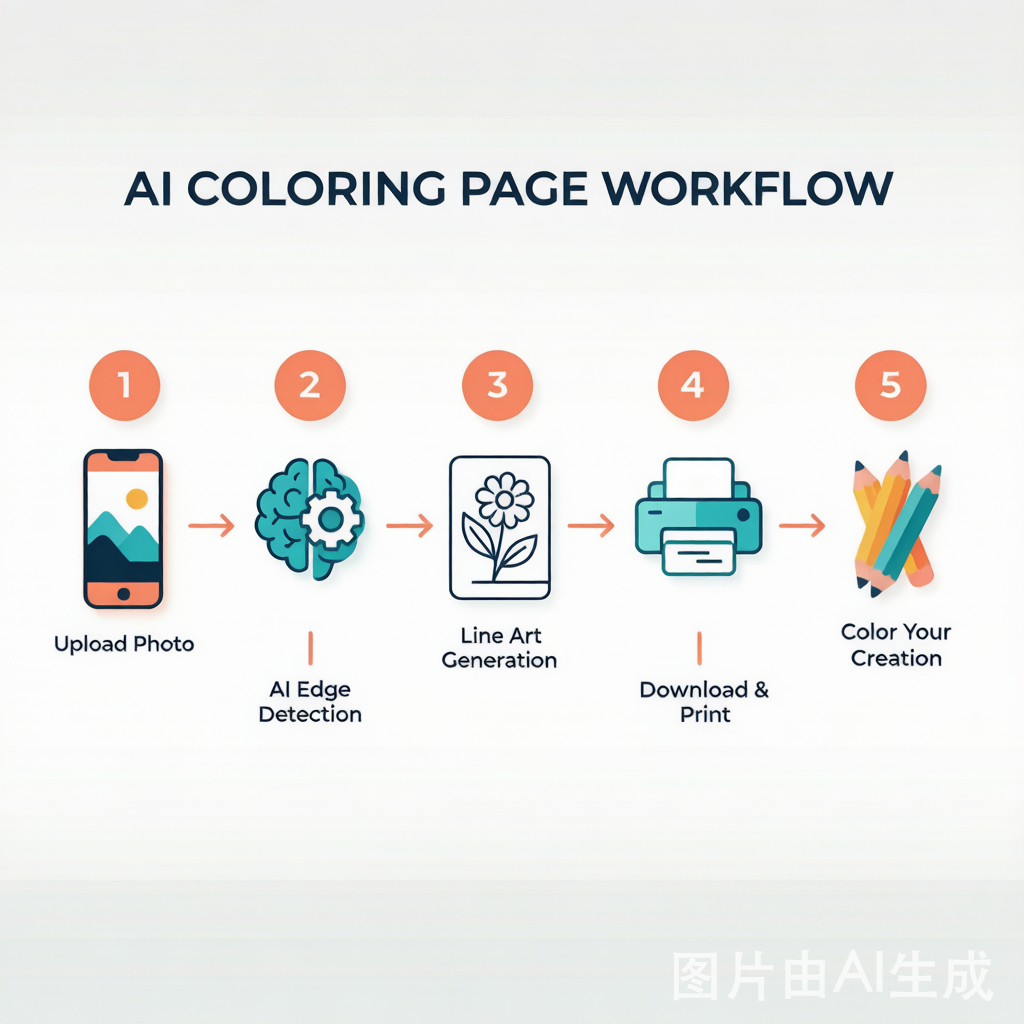
The baseline workflow stays consistent across tools: upload a photo → the AI detects edges and removes color → it outputs a black-and-white line drawing → you download and print. What varies is the fidelity of the line art, the detail retention on faces, and whether shadows get misinterpreted as dark blobs.
How AI Converts Photos to Coloring Pages
Every photo-to-coloring-page tool runs a similar pipeline under the hood, though implementation quality differs sharply between products.
Step 1: Edge Detection and Contour Extraction
The AI identifies object boundaries in your photo — where a face meets the background, where hair ends, where clothing folds. Convolutional neural networks trained on paired image datasets separate meaningful edges from texture noise.
Step 2: Grayscale Conversion and Thresholding
Once edges are identified, the tool strips all color information and applies a binary threshold: pixels are forced to either pure black (lines) or pure white (background). Good tools let you adjust this threshold. Too aggressive, and fine facial details disappear. Too lenient, and you get gray smudges where shadows were.
Step 3: Shading Removal
This is where cheap tools fail. Photographs contain gradient shading from lighting — the side of a face in shadow should become a crisp outline, not a dark gray zone. Advanced AI models from tools like Ideogram and Recraft (ranked #1 and #2 for line art quality in ToolChase’s 2026 comparison) use dedicated shading-suppression layers to prevent this.
Step 4: Line Thickness Normalization
A good coloring page has consistent line weight — thick enough to color inside, thin enough to show detail. Post-processing smooths stroke widths across the image and can detect broken contours (gaps in outlines) to close them automatically.
Step 5: Output and Print Optimization
The final line art renders at your chosen resolution. For a custom coloring page gift that looks professional, export at 300 DPI on A4 or US Letter. If your goal is clean photo to line art for a printable activity book, test one face-heavy image and one object-heavy image before ordering multiple copies.
Comparison: Manual vs Apps vs AI Tools
| Method | Time per Page | Quality Ceiling | Cost | Best For |
|---|---|---|---|---|
| Manual tracing (lightbox, tracing paper) | 30–90 minutes | Artist-dependent | Free (materials) | Single-page art projects; no digital tools |
| Photo filter apps (PicsArt, Photoshop actions) | 5–15 minutes | Medium — requires cleanup | $0–$23/month | Occasional use; users comfortable with editing |
| AI coloring page generators (InkPages, Ideogram, Recraft) | 10–30 seconds | High — purpose-built models | Free tier to $10–$28/month | Gift assembly; bulk coloring books; consistent output |
| AI vector tools (Recraft SVG export) | 20–60 seconds | Highest — infinitely scalable | $10–$48/month | Print-on-demand sellers; commercial product lines |
AI generators occupy the sweet spot for gift creation: they are fast enough to process a batch of 10–20 family photos into a booklet, cost little per page, and the output is consistently clean if you pick the right tool.
The gap between AI tools and manual methods continues to widen. Digiinvent’s 2026 comparison of seven AI coloring page generators found that dedicated tools like ColoringBook.ai and ColorBliss now match the output quality of professional illustrators for standard portraits and pet photos — the two photo categories most commonly turned into gifts.
Common Mistakes
Small details trip up most people on their first few attempts. Here is where things go wrong and how to avoid them.
Uploading low-resolution photos. A 600×400 pixel snapshot from an old phone produces jagged, unusable outlines. Minimum input should be 1200 pixels on the short edge. If the original is small, upscale it with an AI upscaler before running it through the coloring page converter.
Choosing photos with busy backgrounds. A child against a cluttered living room generates dozens of confusing small shapes. Plain backgrounds — a wall, sky, grass — let the AI focus on the subject. Use the background removal option if your tool offers one.
Skipping the preview and printing directly. What looks fine on a phone screen often reveals broken lines and gray artifacts when printed. Preview at 100% zoom before committing to paper. Check facial features especially — eyes and mouths are where AI edge detection most often stumbles.
Mixing shading-heavy photos with basic tools. A photo taken in harsh sunlight with strong shadows will produce dark, uncolorable zones on basic converters. Use a tool that explicitly advertises shading removal, or re-take the photo in diffuse natural light.
Assuming all free tools are equivalent. Some free tools watermark output at export, compress images heavily, or lack privacy controls. If the coloring page is for a framed gift, test the free tier of 2–3 tools side by side on the same photo before committing to one.
Expert Tips for Better Results
After testing five different AI coloring page generators across portrait, pet, and landscape photos — and printing the results on standard copy paper and 120gsm cardstock — here is what separates a good gift from a great one.
Use portrait-mode photos for people. Depth-of-field blur naturally separates the subject from the background, giving the AI cleaner edges to trace. The line clarity difference versus a standard wide-angle shot is visible in the final print.
Batch process for book assembly. Run all photos through the same tool with identical settings to keep line weight and detail density consistent. One page with hair-thin lines next to another with heavy crayon-friendly outlines breaks the professional illusion.
Print on 100–120 gsm paper minimum. Standard 80 gsm copier paper bleeds with markers and wrinkles under watercolor. For gift quality, 120 gsm smooth cardstock handles markers, colored pencils, and light watercolor. Single-sided printing is essential — double-sided bleeding is the #1 cause of 1-star reviews for coloring books.
Pair the pages with quality tools. A gift set with custom coloring pages plus a small pack of colored pencils or fine-tip markers doubles perceived value. Faber-Castell and Prismacolor starter sets ($12–$18) are reliable.
Create a personalized cover page. Generate one extra coloring page from the best photo, add the recipient’s name in a clean typeface, and use it as the cover. This transforms a stack of pages into a cohesive gift.
The most appreciated custom coloring gifts are not the technically perfect ones — they are the ones where the recipient immediately recognizes the photo. A slightly imperfect line drawing of a beloved dog is worth more than a flawless generic mandala.
FAQ
How do I convert a photo to a coloring page for free?
Several tools offer free tiers. Colorify AI and PageCrayon are completely free with no signup required. Ideogram provides 25 free generations per day. InkPages offers a free tier for quick conversions. For the best free results, use a high-contrast source photo and enable any “remove background” option available.
What photo types work best for AI coloring page conversion?
Portraits with clean backgrounds, pet photos taken at eye level, and simple landscape shots with clear foreground subjects produce the strongest line art. Group photos of more than three people tend to produce cluttered results — the AI struggles to separate overlapping figures into distinct line regions.
Will the AI preserve facial features in the coloring page?
The best tools do. Look for a “Keep Face” or “face detail” option if available — this instructs the AI to apply a lighter touch on facial contours so eyes, nose, and mouth remain recognizable but not over-outlined. Portraits photographed in soft, even lighting retain expressions far better than those with harsh directional shadows.
Can I sell coloring pages I create from photos?
Commercial licensing depends on the tool. ColoringBook.ai Professional ($27.99/month) and ColorBliss Artist ($25/month) both grant commercial use rights, making them suitable for Etsy and Amazon KDP sellers. Mimi-Panda charges $0.10 per image for commercial subscriptions. Always verify current licensing terms before listing products — platform policies on AI-generated content evolve quickly.
How many photos do I need for a custom coloring book?
For a meaningful gift, 10–20 pages is the sweet spot. Fewer than 8 feels thin; more than 25 can overwhelm the recipient. Mix 3–4 portrait-style pages with simpler object photos (a favorite coffee mug, the family dog, a garden shot) to vary the coloring difficulty and keep the experience engaging.
Is the photo data kept private?
This varies significantly. Tools with enterprise-grade privacy (ColoringBook.ai, InkPages) process your image and discard it after generation. Free tools without clear privacy policies may store uploads for model improvement. If you are converting photos of children, check the privacy section of the tool’s terms page before uploading.
Choosing the Right Tool for Your Gift Project
The market splits into three tiers based on your timeline and quality needs:
- Quick single-page gifts: Colorify AI, PageCrayon, or the InkPages free tier. Ideal for a last-minute framed coloring page.
- Multi-page custom books: Ideogram (25 free/day), Leonardo AI (150 free daily tokens), or InkPages with a plan. These handle batch generation and maintain consistent line quality across pages.
- Commercial-grade products: Recraft (SVG vector output), ColoringBook.ai Professional, or ColorBliss Artist ($10–$28/month). The tools KDP and Etsy sellers rely on.
For most personal gift projects, the middle tier balances quality and cost. A $10/month plan covers 50–100 conversions — enough for testing, re-dos, and a polished 20-page custom coloring book.
The personalized coloring book ranks among 2026’s most emotionally resonant gifts — a photo memory combined with an interactive activity the recipient completes themselves. ToolChase’s 2026 comparison confirms the technology has moved past novelty into genuinely practical creative territory.
Watch: Photo to Coloring Page in Action
Sources: Verified Market Reports (adult coloring book market size, 2025–2034), ToolChase (AI coloring page generator ranking, 2026), KDPEasy (coloring book publishing trends, 2026), Digiinvent (7 best AI coloring pages generators comparison, 2026), Accio (coloring book market seasonal trends).
Ready to color?
Browse hundreds of free printable coloring pages.